

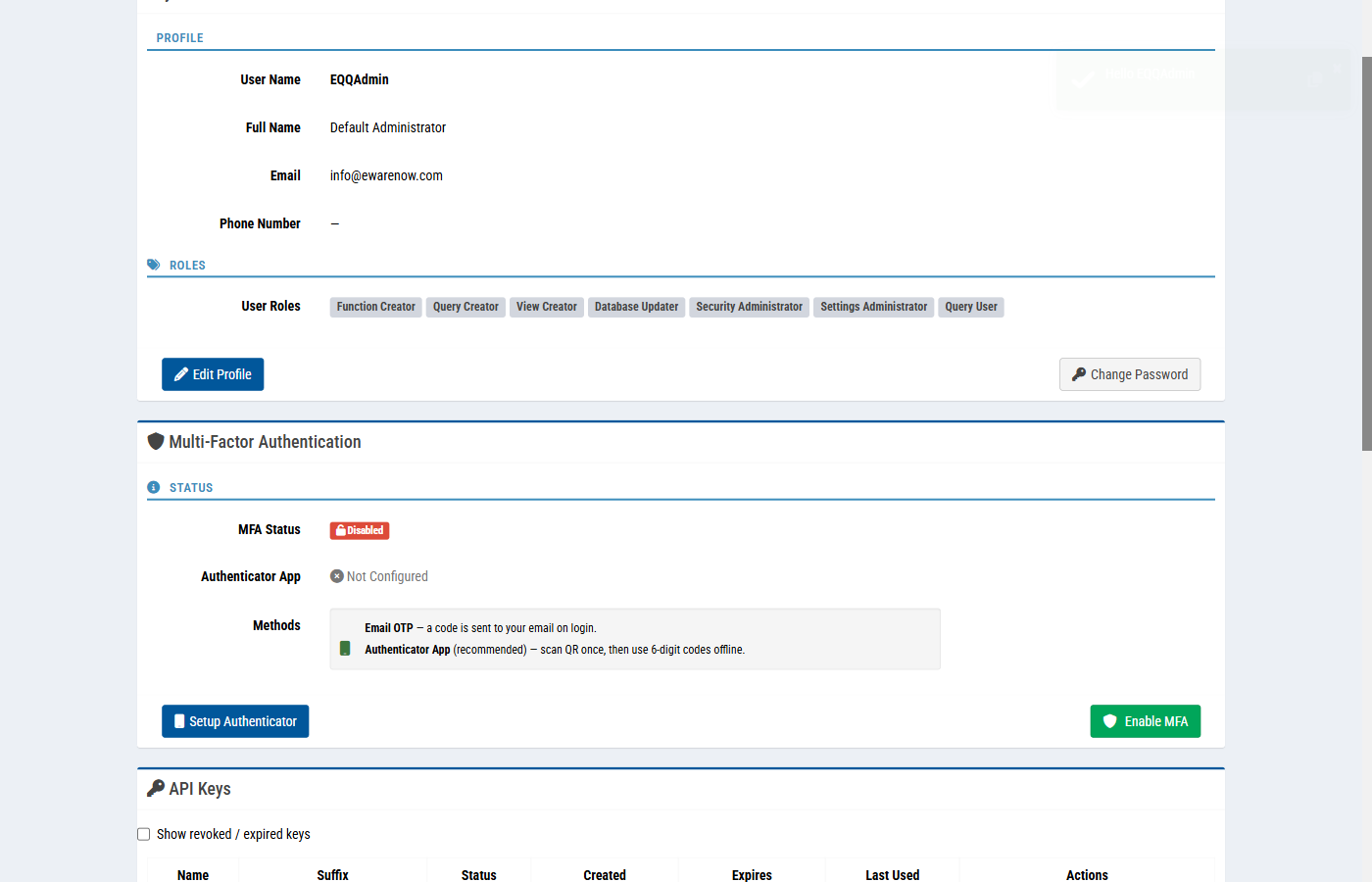
MFA is no longer optional for anyone touching production data. EQQ ships with two MFA methods you can enroll in under a minute: an Email OTP sent to your inbox on every login, or an Authenticator App that generates offline codes after a one-time QR scan.
Two MFA methods in EQQ
EQQ offers two ways to prove your identity beyond a password:
- Email OTP — a code is sent to your email on login. Valid for 2 hours (7,200 seconds) and EQQ allows up to 3 verification attempts before locking the session.
- Authenticator App (recommended) — scan a QR code once, then use 6-digit codes offline. Works with Google Authenticator, Microsoft Authenticator, Authy, and any TOTP-compatible app.
How to enroll your authenticator in under two minutes
- Click your avatar → My Account.
- Open the Multi-Factor Authentication section.
- Choose your preferred method: Email OTP or Authenticator App.
- For Authenticator App: scan the QR code with your app, then enter the 6-digit code to confirm enrollment.
- For Email OTP: a code is sent immediately — enter it to activate.
Organization-wide enforcement
A security admin can require MFA for every account under Security → Password Setting. Users who have not enrolled are walked through setup on their next sign-in.
Trusted devices
On devices you use daily, enter a Device Password at sign-in and check Remember this device. EQQ remembers trusted devices for 365 days, so you are not re-prompted on every login from a known machine. MFA is still required when you sign in from an unfamiliar device — a good balance between friction and safety.
Lockout recovery
If a user loses their authenticator, a security admin can reset MFA under Security → Users → Reset MFA. The user re-enrolls on their next sign-in.
Key Terms
- Email OTP - One-Time Password sent to your registered email address each time you log in. Valid for 2 hours; EQQ enforces a maximum of 3 attempts.
- TOTP - Time-based One-Time Password - a 6-digit code that refreshes every 30 seconds, generated offline by an authenticator app after a one-time QR scan.
- QR code - Quick Response code - the scannable barcode used to transfer your TOTP secret into an authenticator app.
- MFA - Multi-Factor Authentication - requiring a second proof of identity in addition to a password. EQQ supports Email OTP and Authenticator App.
- Trusted device - A recognized device that EQQ remembers for 365 days, reducing MFA friction on repeat logins from the same machine.
Want more Information?

Ewarenow
Related Posts
-

-

Close Month-End Faster With EQQ
Jun 19, 2026 -


